
Visual PDF Builder
Design Any PDF,
Exactly the Way You Want It
PDFDraft’s drag-and-drop canvas gives you complete freedom to place any element anywhere on the page — no rigid blocks, no grid constraints. Build professional PDFs that look exactly how you imagined them.

100%
Free Positioning
6+
Element Types
Real-time
Live Preview
Zero
Coding Required
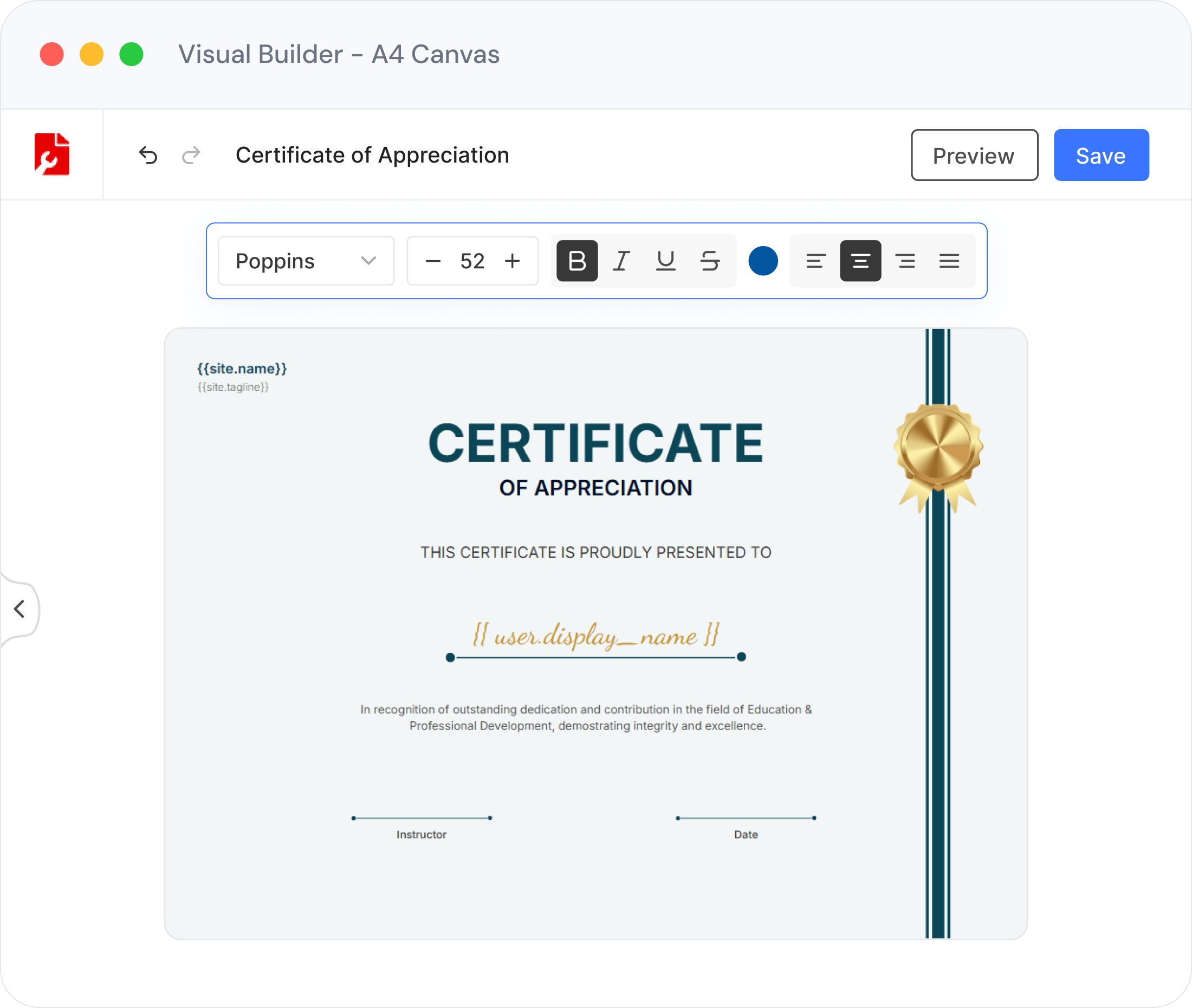
The Canvas
A True Drag-and-Drop Canvas
Most PDF plugins force you into pre-built templates or fixed block layouts. PDFDraft is different — it gives you a free-form canvas where you place every element exactly where you want it, with pixel-perfect precision.
Place text, images, tables, and shapes anywhere on the page
Resize, rotate, and reposition every element freely with snap guides
Layer elements and group them for complex multi-element designs
Preview your design in real time before exporting to PDF
What You Can Build
Everything You Need in One Editor
From a single text block to a full multi-page invoice, the visual editor has all the tools to bring your design to life.

Rich Elements Library
Add text blocks, images, tables, date fields, dividers, and dynamic WP Data Fields from the sidebar. Search by name to find elements instantly.

Full Typography Control
Choose font family, weight, size, color, alignment, and line-height for every text element. Bold, italic, underline, and list formatting are all a single click away.

Layers & Grouping
Control stacking order from the Layers panel. Group multiple elements into a single unit, move them together, and ungroup any time for individual edits.

Pixel-Perfect Positioning
Drag elements anywhere on the canvas, or enter exact X/Y coordinates in millimeters via the Properties panel. Distance overlays show spacing at a glance.

Flexible Tables
Drag a table element onto the canvas, configure rows and columns, adjust cell padding, and edit content inline. Perfect for invoices, order summaries, and data reports.

Pixel Guide & Snap Alignment
Enable the pixel guide to display live distance measurements between elements and canvas edges. Snap guides auto-align as you drag for effortless layouts.
Elements Panel
Every Element You Need, One Drag Away
The Elements panel gives you instant access to every building block for your PDF design. Find what you need with the search bar, then drag it straight onto the canvas.
Text — headings, paragraphs, rich formatting with full font control
Images — upload from the WordPress media library, crop, add borders
Tables — configure rows, columns, cell padding, and borders inline
Date fields — auto-populated with customisable PHP date formats
Dividers — horizontal and vertical lines to separate sections cleanly
WP Data Fields — insert dynamic WordPress content (see Smart Tags below)


Full Design Control
No Grid. No Constraints. Just Your Layout.
Rotate elements to any angle, resize them by dragging corner handles, and hold Shift to lock the aspect ratio. Need exact measurements? Open the Properties panel and type the numbers directly.
Rotate any element to any angle via the rotation handle
Right-click alignment menu: left, center, right, top, middle, bottom
Duplicate, copy/paste, and nudge with keyboard arrow keys
Smooth zoom with Ctrl/Cmd + scroll or pinch gesture on touch devices
Pair With Smart Tags
Make Your Canvas Come Alive with Dynamic Data
The visual builder is even more powerful when paired with Smart Tags. Drop a WP Data Field onto your canvas, type a forward slash, and select any WordPress field — post title, user name, order total, site URL, and more. When the PDF is generated, every tag is replaced automatically with real content.
Popular Smart Tags
/post.title
/user.display_name
/site.name
/post.date
/user.email
Getting Started
From Install to PDF in Minutes
Install Plugin
Download and activate PDFDraft from the WordPress plugin directory
Open the Editor
Create a new PDF design and launch the drag-and-drop canvas from your WP admin
Add Elements
Drag text, images, tables, and data fields from the sidebar onto the canvas
Style & Position
Resize, rotate, and align every element exactly as you want it
Export PDF
Hit Preview to review, then publish. PDFs are generated automatically on demand
Use Cases
What Will You Build?
The visual builder adapts to any PDF you need to create. Here are some of the most popular applications.

Invoices & Receipts
Design professional invoice layouts with tables for line items, dynamic customer data fields, and your company branding — generated automatically per order.

Course Certificates
Design stunning certificates with decorative borders, signature lines, and auto-inserted student names. No two certificates need to look alike.

Post & Page PDFs
Turn any WordPress post or page into a beautifully formatted PDF. Pull in the content via smart tags and style it exactly the way you want.

WooCommerce Documents
Build branded packing slips, order confirmations, and shipping labels. The canvas lets you match your store’s look precisely.

Event Invitations
Create polished invitations with images, custom typography, and event details. Export once and distribute to any attendee list.

Custom Reports
Generate on-demand reports from WordPress data. Combine tables, headings, and dynamic fields into a structured document layout your readers will appreciate.
START BUILDING TODAY
Your PDF Canvas Is Waiting
Install PDFDraft free and start designing pixel-perfect PDFs in minutes. No coding, no templates, no limits —
just your layout, exactly as you imagined it.